
This is one of a series of guides created by Radiant Law to help in-house legal teams improve their contracting processes. Although these guides are focused on handling commercial contracts, many of these technologies and approaches can be applied to other activities that you do.
Here’s a simple version of the contracting process:

Document automation (or contract automation) is the technology used to make the drafting stage easier. It fundamentally works like this: the user answers some questions and the system spits out a contract that is tailored based on the answers:
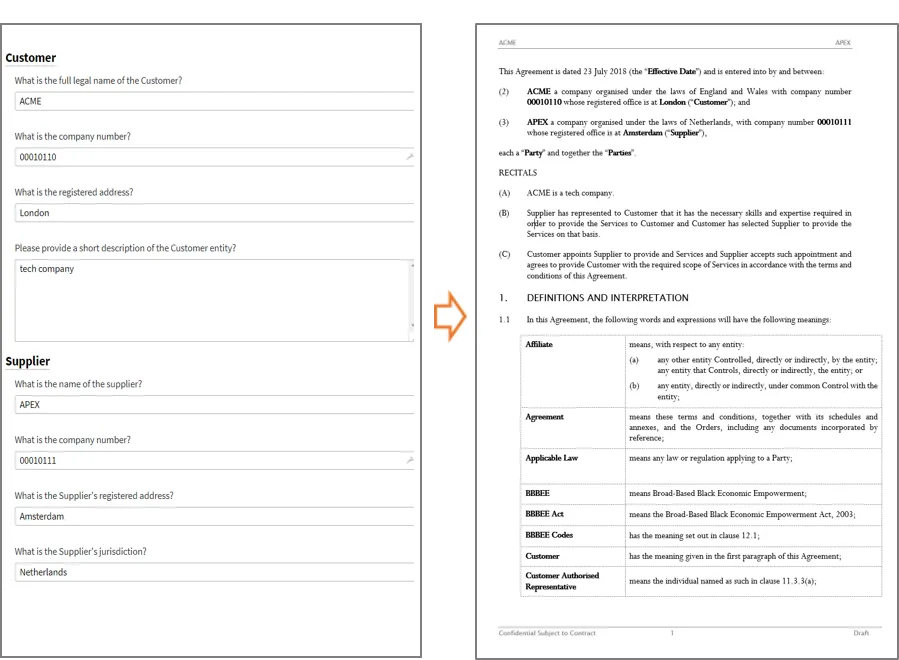
The questions can be answered in the browser using a form, but there are alternatives such as using chatbots (although these tend to focus on access to justice use cases).
Think of it as a one-shot process: once you’ve created the initial document, you are usually done with document automation.
In some cases the document that is created is ready to send to the other side and you’re in to the negotiation stage. Alternatively, use document automation to get you most of the way there with a draft and then tweak to deal with the unique deal points.
Here are some reasons why you should be using document automation:
Creating a contract using document automation takes a few minutes. You can also create a suite of related documents at the same time, based on the same answers. It can also be used, with the right contracts, to allow the business to create a contract without needing to refer to legal.
There is huge business value in speeding up entering into contracts. Faster sales contracts improve cash flow for the business. Faster procurement contracts improve business agility. Spending less time creating your contracts frees you up to deliver more and makes your job more interesting as you can focus on the more complex work.
Unfortunately we all regularly make mistakes. Document automation removes many of those opportunities for errors.
Document automation also brings a rigour that ensures that the key issues are addressed in every contract, rather than relying on the user to remember - it acts as a checklist. It also helps ensure that previous deal documents, where key provisions were removed as being not relevant, aren’t used as the basis for the next agreement.
Template agreements are generally getting longer and more unwieldy. As issues come up in negotiations, points are added to contracts, and it is rare that the template gets shortened. There are also limits to how far you can expect a user to go in tailoring a Word version of a contract for the particular circumstances of a deal.
Document automation lets you break out of this cycle. You have a way to ensure that issues are considered every time as the contract is created but only addressed in the agreement when relevant. The result is shorter documents that will be faster to negotiate as they are focused on the key deal issues.
Document automation has an interesting side effect. When legal teams create or update their templates, they will often go through an epic process of drafting, feedback (aka drafts sitting on team-mates’ desks for weeks) and internal stakeholder management that, like a law of physics, seems to always take six months.
At the end of this process, an announcement is made to use the new template. No one has the appetite to change the template ever again and there is a perennial worry that if small changes are made then the users won’t know which is the right template.
There’s a better way. Document automation allows you to ensure that users are always going to the right place to create their contracts. This means that you can keep updating the template as you identify improvements that are coming out of negotiations or as the business changes its products and needs. These iterative improvements allow you to “knock the edges” off your contracts, getting rid of needless negotiation and having a far greater impact on the end-to-end speed to enter into contracts than just speeding up the drafting stage.
We’ve found that the most important point in the businesses experience working with legal is initial responsiveness. No-one is able to sit around, waiting for the business to ask for help, to immediately create a draft. But if you give your business users the ability to create a draft safely using a document automation system, then you will be a legal hero.
Document automation systems are fundamentally doing two things when they create a contract, depending on the answers given by the user:

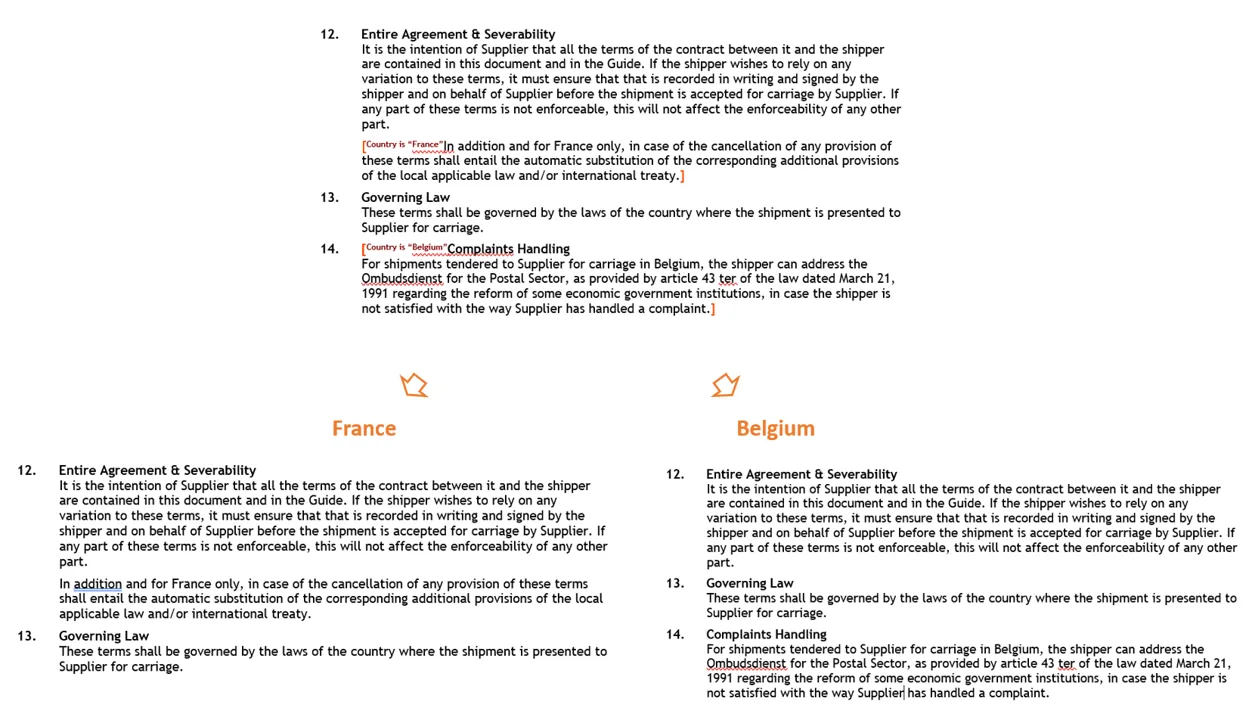
Between these two simple actions, there are no limits to how tailored you can make your contract.
There are three stages in implementing document automation:

We are going to cover these steps below, but it’s helpful first to understand how these systems work. There are three parts to defining the contract that are set up in the automation stage.
The logic part is where document automation starts to look like programming. But really this is usually very simple programming, along the lines of:
IF the user answers “customer” to the question “Which party will own the IP created under the services contract?” THEN include the IP transfer clause ELSE include the no transfer of IP clause.
Breathe again.
Different systems will have different ways of implementing these three parts, and some systems are much easier to do the automation. As we will come back to below, one of the key (and underestimated) factors in choosing a system is how easy the system is to use during the automation stage.
A final point to note: the logic (such as if… then… statements) that are used in automating your template are a way of capturing expertise about how to handle different situations. You’re really building a mini expert system that lets you treat your contracts as a branching system of alternatives, rather than linear locked down templates. Be warned, you may start to reason differently about your contracts.
We regularly see companies caught up in complex evaluations of the many systems available in the market. The larger the company is, the worse this process gets. Getting something in place is better than analysis paralysis. We highlight some of the points to consider below, but this is an area where getting going is important.
Migrating templates from one system to another in the future is simpler than creating them in the first place. Yes, you will have to rebuild them, but you will have done the hard yards of figuring out the logic and language, which takes time and is why starting sooner rather than later matters.
And you don’t necessarily need to buy your own system. We regularly just add clients to our document automation cloud system and get their first template up and running in a week or two.
Carpe diem!
There is a battle of approaches going on in lawtech between:
Choosing between the approaches is a hard decision. A good point solution is going to be better; in the right situation an end-to-end solution may be good enough. Point systems can often be integrated with other systems, but it can be a pain. End-to-end solutions come with integration (at least between the different contracting stages), but are less flexible, often opinionated and may be suboptimal for all your different use cases. Be careful of end-to-end solutions that tick every box in the contracting process but are weak at each stage (some of the older contract management systems - we’re looking at you).
We prefer point solutions at Radiant, so we built the integrations needed to make it work and can help you with this. There’s no right answer for this one, other than not being paralysed.
At Radiant, we use Contract Express from Thomson Reuters and Docassemble (an open source option that we have integrated into our toolset). The market has exploded with options, but here are some of the more popular choices.
The two most established providers that continue to be seen as market leaders are:
All are excellent systems and worth considering.
As part of the latest wave of lawtech a number of new contenders have emerged with end-to-end systems that have great user interfaces. Ones to look at include:
Document automation requires bringing together legal expertise in the subject matter and technical expertise in the system. Ideally this is in one person, but the reality is that the editing systems are still complex enough that you can’t assume that every lawyer is going to learn to automate their documents.
The best outcome in practice is that a legal expert (who understands enough about the system) works with a technical expert (who understands enough about contracts). The more legal background the technical expert has, the better, but people combining deep skills in both are unicorns (well, one or two exist).
There are a number of options for how you bring automation expertise into your company. Note that not all of these options are possible if you choose a system where the supplier has to do the automation, which can be the case for the newer and less mature systems). Also, the UK market is some way ahead of the US market in this area and the external expertise in document automation in the US is limited.
Providers who can help you include:
There are a couple of approaches to choosing where to start with automating your contracts:
We highly recommend getting a template up and running as quickly as possible and then improving it over time. Think of your threshold as the absolute minimum number of questions/options to make the system marginally faster and more useful than doing the drafting manually.
Be careful to avoid disappearing down rabbit holes trying to cover every option. The law of diminishing returns applies and you will identify the most useful additional options quickly once your automated template starts to be used.
Let’s assume that the automation is going to be done by someone other than the contract expert (otherwise the steps below are going to be a lot simpler):
Document automation is one of the most powerful technologies to improve your contracting process. If you’ve done the hard yards to create good templates, it can be quick to implement and make you a hero with the business.
The pitfalls are paralysis and perfectionism. Get something up and running and keep improving it over time.
You might be wondering what your next steps should be. Let us guide you with three easy options:

We use cookies to monitor the performance of our website and to improve user experience. By continuing to browse our site, you agree to our use of cookies.