
Closing the Copilot gap in legal delivery

The situation
Like most large organisations, our client had Microsoft Copilot across the business. It was on every lawyer's desktop. For legal, the question wasn't whether to use it, but how to use it well on contract work, where an inconsistent answer carries more risk than in a draft email.
Radiant already supports a large share of the team's contracting, including framework agreement and associated agreement negotiations, risk reviews, gap analysis, and developing playbook and processes. As AI became part of how that work got done, the team wanted a clear view of where it sat in the process and where lawyers were making the calls.
That's a process and operational question any regulated business should be asking.
What we found
The tool is general; contract work is specific.
Copilot is built for everyone. Contract work needs outputs anchored to a particular template, playbook or checklist. Without that anchor, results vary from person to person.
Without a shared starting point, good practice stays with individuals.
The lawyers who find prompts that work rarely have an easy way to pass them on.
The value is upstream of the prompt.
Asking Copilot to "review against the playbook" is only as good as the playbook. The hard part is the legal content the prompt points at: positions, fallbacks, business specific context.
Visibility mattered as much as capability.
The team wanted to see the whole lifecycle in one place, not a scattered set of AI experiments.
What we built
We did two things.
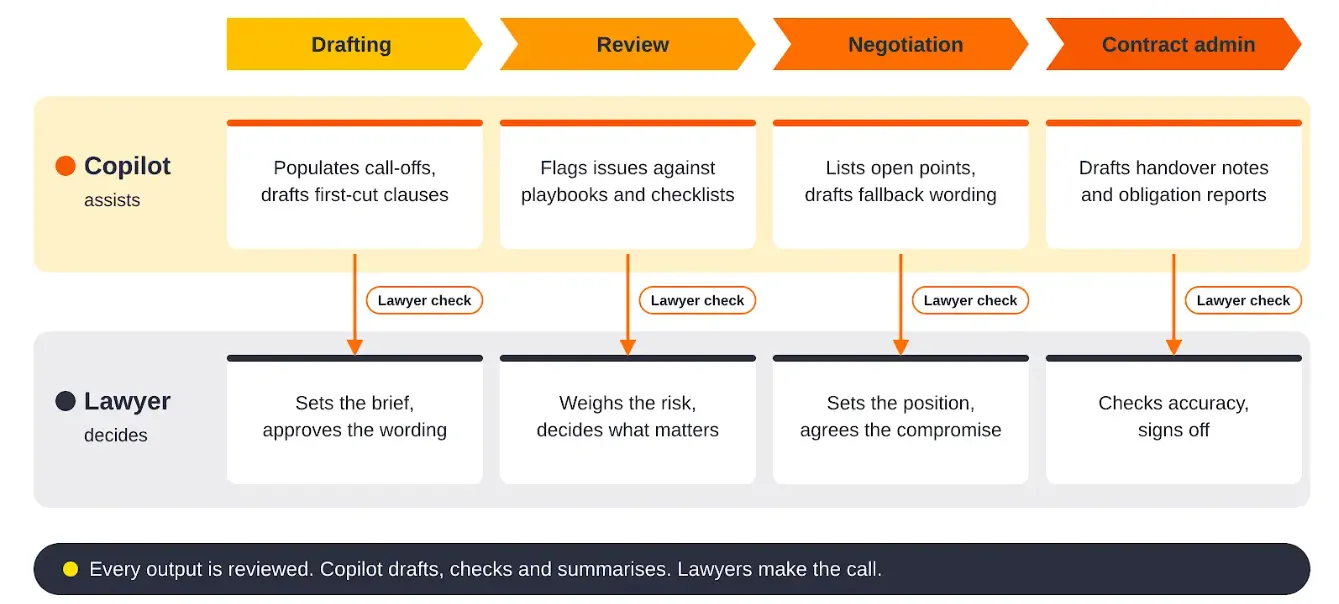
First, we walked the team through the full contracting lifecycle in a recorded show-and-tell: each stage of the work, where AI assists, and where lawyer judgement takes over.
That gave everyone a shared picture and something to come back to.
Second, we turned that picture into a Copilot usage guide across that very same contracting lifecycle: a menu of model prompts the team's own lawyers can select and adapt, organised by the stage where each is most useful.
Everything runs natively inside their existing stack, governed by the security and permissions they already trust.
How the guide was designed:
- Built on positions and playbooks we developed with the team. Prompts point at our client's templates, playbooks, risk review templates and regulatory checklists, not generic standards.
- Quick to find. Organised by lifecycle stage, with prompts that span stages flagged as such.
- Adaptable, not scripted. Each prompt is a starting point lawyers tailor to the matter in front of them.
- The lawyer stays accountable. Every output is reviewed. Copilot drafts, checks and summarises; and the lawyers decide.
The difference it made
- Legal now has a clear use for Copilot. A tool the business already had now has a defined, legal-approved use at every stage of contracting.
- Consistency becomes the default. The same playbook check runs the same way, regardless of who runs it.
- The capability belongs to the client. The guide works for the in-house team's own matters, not just the work we support, and can travel across the wider legal function.
- Reportable AI use. Legal leadership can show, stage by stage, where AI is used and where lawyers sign off. That gives governance and risk teams a clear picture.
The prompts are the visible part. What makes them work is what the team already had: experienced lawyers with a deep sense of what good looks like, built up over years of deals.
Our role was to orchestrate the contracting process end to end: mapping ways of working, tasks, assets and workflows, then connecting them to the right resources and embedding them into Copilot to enable consistent, repeatable outputs.
We think that step is still the gap most legal teams need to close before AI can work effectively across their whole contracting lifecycle.
Talk to us about what closing the Copilot gap would look like in your team.
Talk to Radiant about managed legal services, contract projects or specialist support for your team.

We use cookies to monitor the performance of our website and to improve user experience. By continuing to browse our site, you agree to our use of cookies.
